For full functionality of this site it is necessary to enable JavaScript.

カラーキャリブレーション機器

Consistent color is essential wherever images, graphics, and visual output need to be evaluated accurately. In photography, design, printing workflows, and digital content production, even a high-quality display can lead to unreliable decisions if brightness, white point, and tonal response are not controlled properly. That is why color calibration equipment plays an important role in maintaining a more dependable visual workflow.

This category brings together tools designed to help users measure and adjust monitor performance, compare color appearance under controlled conditions, and build a more repeatable editing environment. For teams looking for broader calibration instruments beyond display and color work, it can also be useful to explore multifunction calibrators for other technical measurement tasks.

Color calibration tools for monitor and visual workflow adjustment

Why color calibration matters in professional workflows

A monitor rarely shows color in a perfectly neutral way straight out of the box. Brightness may be too high, shadows may be compressed, or white balance may drift over time. In practical terms, this can lead to inconsistent image editing, mismatched prints, and difficulty aligning multiple displays in the same studio or workstation.

Using display calibration tools helps reduce that uncertainty by giving users a measurement-based method to profile the screen rather than relying only on visual judgment. This is especially relevant for photographers, retouchers, designers, prepress teams, and anyone reviewing visual assets where color fidelity affects the final result.

What you can find in this category

This range focuses on instruments used for monitor and visual color control. It includes sensor-based monitor calibration devices as well as supporting tools used to improve exposure and color reference in image workflow. The purpose is not only to adjust one screen once, but to support a more stable process across editing, review, and output stages.

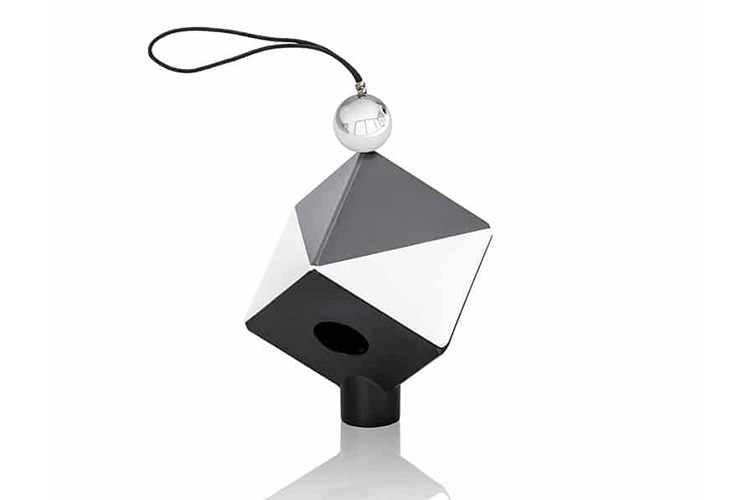
Examples in this category include the Datacolor Spyder X Pro, the Datacolor SpyderPro, and the Datacolor Spyder monitor calibrator variants designed for different luminance ranges and workflow needs. The Datacolor Spyder Cube is also relevant as a practical accessory for capture and reference workflows, helping users establish a visual baseline during image correction and raw processing.

Datacolor solutions for monitor calibration

Datacolor is a recognized name in this segment, and the products shown here are aimed at users who need straightforward hardware-assisted calibration for modern displays. Depending on the model, these tools support common current display technologies and may offer functions such as ambient light measurement, room light adjustment, display matching, and profile comparison.

The Datacolor Spyder X Pro is suited to users who want an accessible monitor calibration tool for regular display setup and maintenance. For workflows that involve brighter displays, more advanced control, projector use, or side-by-side matching across multiple screens, the SpyderPro provides a broader feature set. The Spyder monitor calibrator options in this category also help cover different user requirements, from basic calibration routines to more flexible profile management.

How to choose the right color calibration device

The best starting point is to define the environment in which the device will be used. A single-monitor editing station has very different needs from a studio with multiple displays, mixed lighting conditions, or frequent collaboration between operators. If color decisions affect print output, client approval, or cross-device consistency, it makes sense to select a tool that supports repeatable calibration targets and comparison functions.

It is also important to consider display type, brightness level, operating system compatibility, and connection interface. Some users simply need a practical calibrator for periodic monitor checks, while others require support for higher luminance displays, more detailed adjustment options, or workflow features such as ambient light analysis. In broader instrument environments, teams may also compare their needs with other calibration families such as temperature calibrators when building a complete maintenance and verification program.

Typical applications and users

Color calibration equipment is commonly used in photography studios, graphic design departments, print preparation, content creation teams, and video editing environments. In these settings, the goal is not only to make colors look pleasing on one screen, but to improve consistency from capture to edit to final delivery. Even small deviations in monitor behavior can affect skin tones, product colors, branding elements, and grayscale transitions.

These tools are also relevant in organizations where several displays need to be aligned to a shared visual standard. Matching screens across workstations can make collaboration easier and reduce disputes caused by display variation rather than actual file differences. For users specifically comparing options in this segment, the color calibration equipment category remains the most direct place to review relevant products together.

From basic correction to a more controlled visual workflow

A calibration device is most effective when it is used as part of a routine rather than as a one-time setup tool. Displays age, ambient light changes, and workstations are often moved or reconfigured. Regular recalibration helps maintain a known viewing condition, which is especially useful when projects are revisited over time or handed between team members.

Supporting tools can also improve workflow discipline. For example, the Datacolor Spyder Cube is not a monitor calibrator, but it serves a useful role in image capture and reference by helping users evaluate highlight and shadow behavior during correction. Combined with a monitor calibration device, it supports a more controlled path from shooting to editing.

What to review before buying

Before selecting a device, check whether it fits your display environment, operating system, and expected use case. If you work with standard office or creative monitors, an entry-to-mid level solution may be sufficient. If you use high-brightness screens, need more customization, or manage multiple displays, a model with broader control and comparison features may be the better fit.

It is also worth reviewing whether your process depends on room light measurement, support for several connected displays, or additional functions for proofing and visual verification. Choosing based on actual workflow requirements usually leads to a better long-term result than selecting purely by price or by headline specifications.

Build a more reliable color workflow

When visual accuracy matters, a calibrated display is a practical foundation rather than an optional extra. The products in this category are intended to help users create a more repeatable viewing environment, reduce uncertainty in color decisions, and support consistent output across editing and review stages.

Whether you need a straightforward monitor calibration tool or a more capable solution for advanced display setups, this category provides a focused starting point. By comparing workflow needs, display conditions, and calibration depth, buyers can choose color calibration equipment that fits their process more naturally and supports better day-to-day control.


おまけチャンス‐ニュースを受ける登録